Azure Boards
Azure Boards is a standalone service within the Azure DevOps suite that helps teams plan, track, and discuss work across the entire software development process. It provides a flexible, customizable platform for managing work items, such as user stories, bugs, tasks, and issues, so you can track your work item's progress throughout the development lifecycle.
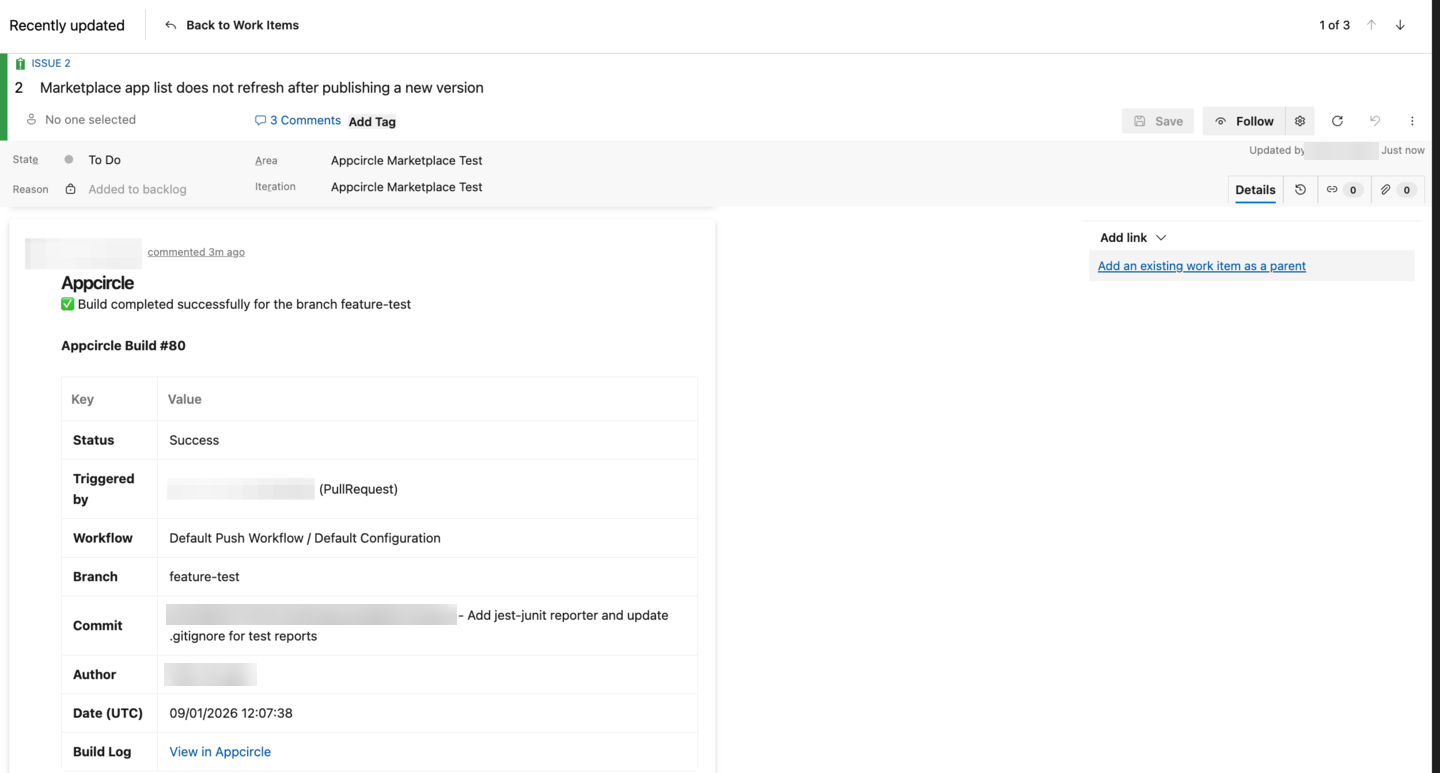
By adding Appcircle's Azure Boards component to your workflow, you can post a comment on a work item and optionally change its state according to the result of your workflow.
Prerequisites
Before using the Azure Boards step, make sure you have the following:
- An Azure DevOps organization and a project that contains the work items you want to update.
- A personal access token (PAT) with the Work Items (Read & Write) scope, together with the email of the account that owns it.
- An Environment Variables group that holds those credentials, connected to your build profile. For security reasons, we recommend adding the token as a secret variable using the lock icon rather than entering it into the step inputs directly.
- The ID of the work item to update, available to the step as an environment variable. See Getting the Work Item ID Dynamically to extract it from the branch name.
The Azure Boards step changes the state of the relevant work item only when you fill in $AC_AZUREBOARD_SUCCESS_STATE or $AC_AZUREBOARD_FAIL_STATE. If you leave both empty, the step only posts a comment and never touches the work item state.
If you do use states, make sure the step is placed in the correct order in your workflow. The step writes the state based on the workflow result at the moment it runs, so if a later step fails, the work item stays in the success state.
To ensure that the Azure Boards step runs even if your workflow fails, enable the Always run this step even if the previous steps fail switch. This switch is required for $AC_AZUREBOARD_FAIL_STATE to take effect.
Getting the Work Item ID Dynamically
To add a comment, the work item ID must be supplied to the component. We need to get this ID dynamically so that our workflow can work for multiple branches. Appcircle components use environment variables to pass the state. We can add a step just before the Azure Boards step to prepare the necessary environment variables.
For example, you're working on a feature branch called feature/onboarding-1. You may use the below Ruby script to get the work item ID 1 from the branch name and use this information with the Azure Boards step. Please see the Custom Script documentation for this implementation.
branch = ENV['AC_GIT_BRANCH']
work_item_id = branch.split('-').last
puts work_item_id

# Write Environment Variable
open(ENV['AC_ENV_FILE_PATH'], 'a') { |f|
    f.puts "AC_AZUREBOARD_WORKITEM=#{work_item_id}"
}
The script writes an environment variable named AC_AZUREBOARD_WORKITEM, and that is exactly the variable the Azure Boards step reads through its $AC_AZUREBOARD_WORKITEM input. Since the input already defaults to $AC_AZUREBOARD_WORKITEM, you can leave it untouched and the value produced by the script is picked up automatically.
Adjust the parsing logic to match your own branch naming convention. The example above takes the segment after the last hyphen, so it also works for a branch such as feature/onboarding-page-12, but a branch whose name does not end with the work item ID needs a different rule.
Changing Template
The comment is sent to the Azure DevOps REST API as a JSON Patch document, so $AC_AZUREBOARD_TEMPLATE is not free text: it must be a JSON array of patch operations. Appcircle provides the default template below, which adds the commit message, the commit hash, and the workflow name to the work item:
[
  {
    "op": "add",
    "path": "/fields/System.History",
    "value": "<div><b>Commit:</b> $AC_COMMIT_MESSAGE | $AC_GIT_COMMIT<br></div><div><b>Workflow:</b> $AC_WORKFLOW_NAME<br></div>"
  }
]
Variables prefixed with $ are replaced with their values during the build. System.History is the discussion field of the work item and its value accepts HTML, which is why the default template uses HTML tags. The step also prepends a line that reports whether the build succeeded or failed for the branch.
You can add further operations to the array to update other fields of the work item. Do not add an operation for /fields/System.State yourself: the step appends that operation automatically when $AC_AZUREBOARD_SUCCESS_STATE or $AC_AZUREBOARD_FAIL_STATE is filled in.
Input Variables
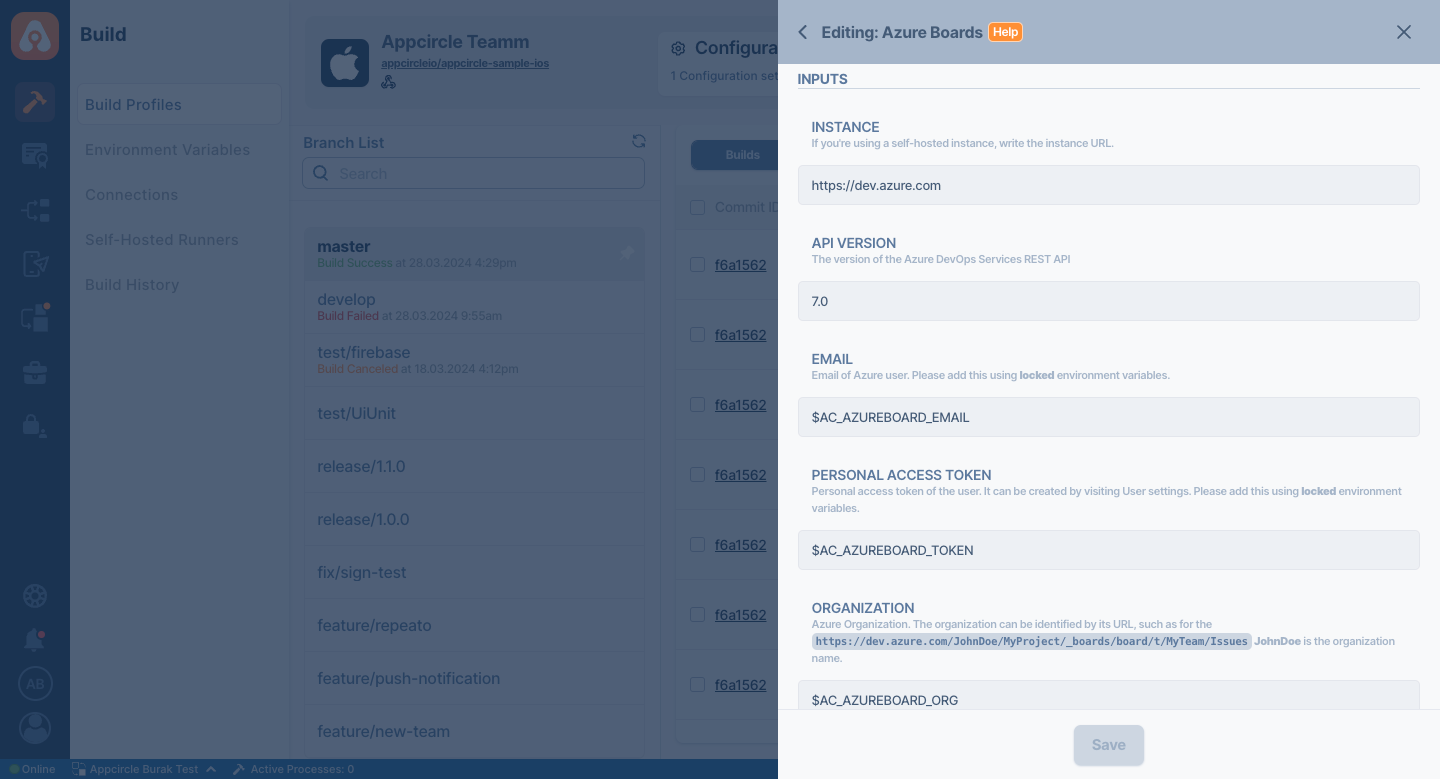
This step needs the input variables below in order to work. The table below explains these variables.
Please do not use sensitive variables such as Username, Password, API Key, or Personal Access Token directly within the step.
We recommend using Environment Variables groups for such sensitive variables.
| Variable Name | Description | Status |
|---|---|---|
$AC_AZUREBOARD_INSTANCE | The base URL of your Azure DevOps instance, including the scheme. For Azure DevOps Services this is https://dev.azure.com, which is also the default value. For a self-hosted Azure DevOps Server, enter your own URL, for example: https://azuredevops.mycompany.com/tfs | Required |
$AC_AZUREBOARD_API_VERSION | The version of the Azure DevOps Services REST API. The default value is 7.0 | Required |
$AC_AZUREBOARD_EMAIL | The email of the Azure DevOps account that owns the personal access token. Please use Environment Variables. | Required |
$AC_AZUREBOARD_TOKEN | Personal access token of the user, with the Work Items (Read & Write) scope. It can be created by visiting User settings. Please add it as a locked Environment Variable. | Required |
$AC_AZUREBOARD_ORG | Azure DevOps organization. The organization can be identified by its URL: for example, in https://dev.azure.com/JohnDoe/MyProject/_boards/board/t/MyTeam/Issues, JohnDoe is the organization name. On a self-hosted Azure DevOps Server, enter the collection name instead. | Required |
$AC_AZUREBOARD_PROJECT | Azure DevOps project. The project can be identified by its URL: for example, in https://dev.azure.com/JohnDoe/MyProject/_boards/board/t/MyTeam/Issues, MyProject is the project name. | Required |
$AC_AZUREBOARD_WORKITEM | Azure work item ID. The work item ID (integer) is shown next to the work item title in Azure Boards. Refer to the Getting the Work Item ID Dynamically section for instructions on extracting it from branch names. | Required |
$AC_AZUREBOARD_FAIL_STATE | The state name applied when a previous step fails, for example Doing. Optionally change the state of your work item if the previous steps fail. Ensure that the Always run this step even if the previous steps fail switch is enabled for this feature to work. | Optional |
$AC_AZUREBOARD_SUCCESS_STATE | The state name applied when the previous steps succeed, for example Done. Optionally change the state of your work item if the previous steps succeed. | Optional |
$AC_AZUREBOARD_TEMPLATE | The JSON Patch document used to post a comment. Variables denoted with $ will be replaced during the build. A default template is provided. Refer to the Changing Template section to modify it. | Required |
Please check the Azure Boards Component documentation for more information.
To access the source code of this component, please use the following link: